Find Leads in Facebook Groups Without Joining 500 Groups Manually
Right now, someone in a Facebook Group is typing "can anyone recommend a good accountant in Austin?" or "we need a project management tool that works with Slack, any suggestions?" They'll get 10 responses in the next hour. One of those responses could be yours. But only if you know the post exists.
That's the core problem with Facebook Groups as a lead source. The conversations are happening constantly, across thousands of niche communities, and they're full of buying intent. But nobody can monitor them all manually. That's exactly what Hot Lead Alerts solves. This guide covers how to use Facebook Group monitoring as a real, repeatable lead generation system.
Why Facebook Groups Are the Most Underrated Lead Source in 2026
Facebook Groups are the most underrated place to find warm leads in 2026, because they combine massive scale with specific, high-intent conversations that happen in public. Over 3 billion people use Facebook every month, and a huge portion of that activity happens inside Groups, not on brand pages or news feeds.
Most marketers skip Facebook Groups entirely. They run ads, chase LinkedIn prospects, or cold-email lists. That leaves a wide-open lane for anyone willing to show up in the right communities at the right moment.
The Signal Is Different From Every Other Channel
A Facebook Group post asking "who do you use for payroll software?" is not a passive impression. It's an active, public request for a recommendation. The person is in buying mode right now. That's a fundamentally different signal from someone clicking an ad or downloading a whitepaper.
According to Sprout Social's Facebook statistics data, Facebook Groups drive more meaningful peer-to-peer interactions than brand pages. That means users trust Group recommendations over branded content. When you respond helpfully to a Group post, you arrive with the credibility of a community member, not an advertiser.
Search Volume Is Rising Fast
Searches for "facebook group monitoring" have grown more than 200% year over year. Businesses are waking up to this channel, but the tools and tactics are still thin. Getting in now means owning the approach before it's crowded.
The Problem: Your Customers Are in 50+ Groups You'll Never Find Manually
Your customers don't live in one Facebook Group. They're scattered across dozens of niche communities, local groups, industry forums, and interest-based pages. A small business owner looking for accounting software might be active in a freelancers group, a local business owners group, a female founders group, and three industry-specific communities all at once.
You can't join all of them. Even if you could, you'd spend hours scrolling through memes, event announcements, and off-topic posts to find the one recommendation request that matters. That's before you consider that most Groups require approval to join, which can take days or get rejected entirely.
Manual Monitoring Doesn't Scale
Let's do the math. If you join 20 Groups and each Group produces 50 posts per day, that's 1,000 posts to scroll through every 24 hours. Most of those posts are noise. You might find 2-3 buying-intent posts per day. That means 997 posts of effort for 3 leads, and you'll still miss Groups you're not a member of.
This is the gap that separates businesses that genuinely find leads through Facebook from those who try once and give up. The manual approach simply doesn't work at any meaningful scale.
The Timing Problem Makes It Worse
Even when you do spot a relevant post, timing matters enormously. A "who do you recommend?" question in a Facebook Group typically gets 10+ responses within the first hour. If you respond six hours later, the person has already made their decision. You're too late, and responding at that point feels desperate rather than helpful.
Monitoring facebook groups for leads isn't just about finding the right posts. It's about finding them fast enough to matter.
How Hot Lead Alerts Monitors Facebook Groups in One Stream
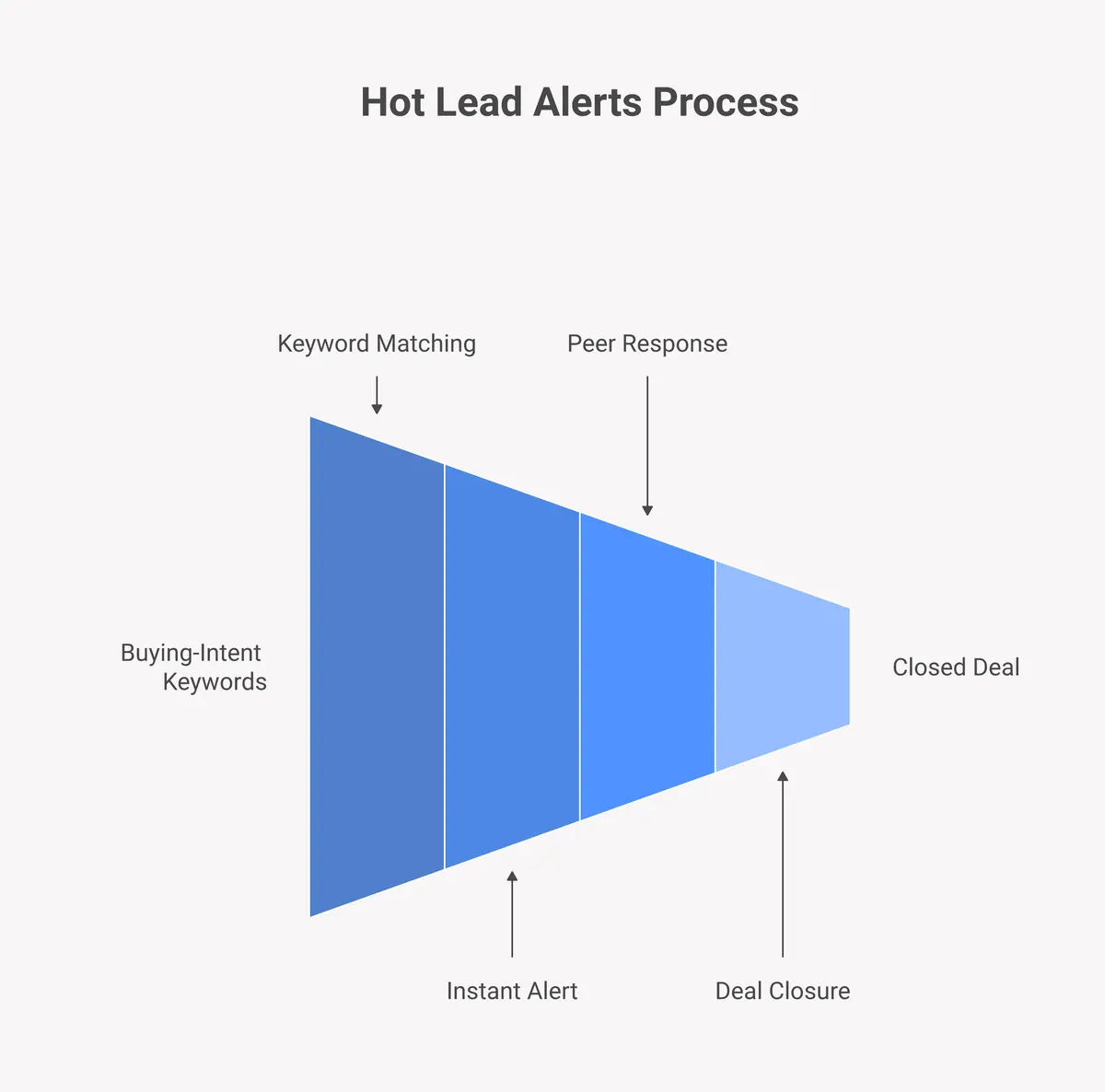
Hot Lead Alerts connects to Facebook Groups and surfaces buying-intent posts in a single alert stream, so you don't need to be a member of every Group to know what's being said. You set keywords, and the platform does the scanning. When a post matching your keywords appears, you get an alert you can act on immediately.
How the Keyword Matching Works
You define the terms that signal buying intent in your niche. Words like "recommend," "looking for," "anyone use," "switching from," or your competitor's name. When those terms appear in a Facebook Group post, Hot Lead Alerts catches them and sends you an alert with the post content and a direct link.
You don't need to scroll through anything. You don't need to be in every Group. You just respond to alerts that match your criteria, which means every minute you spend is focused on active, qualified prospects.
One Stream, Five Platforms
If your customers aren't just on Facebook, Hot Lead Alerts monitors Reddit, LinkedIn, Twitter/X, and Instagram in the same dashboard. You can see a Reddit lead monitoring alert alongside a Facebook Group post alongside a LinkedIn lead alert, all in one view. That multi-platform visibility is something no manual approach can replicate.
Ready to catch your next Facebook lead before a competitor does? Start your free account and set up your first keyword in under three minutes.
What Keywords to Track in Facebook Groups
The most effective Facebook Group keywords for lead generation are phrases that signal active buying intent rather than casual curiosity. These are the terms people type when they're ready to spend money or make a decision, not when they're just browsing.
Universal Buying-Intent Templates
These keyword patterns work across almost any industry. Use them as a starting point and customise with your niche terminology:
- "anyone recommend a good " - the classic recommendation request
- "looking for a in " - local and SaaS buying intent
- "we're switching from " - in-market signal with a clear trigger
- "anyone tried ?" - research phase, but close to a decision
- "need help with " - service businesses especially
- "what do you use for" - high-intent research
- "frustrated with " - actively shopping for alternatives
Industry-Specific Keyword Examples
For SaaS tools: "recommend a CRM," "project management tool recommendation," "best invoicing software," "Slack alternative," "anyone using "
For local services: "good plumber in ," "recommend a dentist near," "best marketing agency in," "who does your bookkeeping"
For coaches and consultants: "business coach recommendation," "looking for a copywriter," "need a web designer," "anyone worked with a brand strategist"
For agencies: "SEO agency recommendation," "need a social media manager," "looking for a PPC specialist," "anyone hiring a VA"
Add competitor brand names as keywords too. "Anyone tried ?" and "switching from " are among the hottest leads you'll find, because the person is already in comparison mode. See how this same approach works for social listening lead generation across all platforms.
Facebook Pages vs Facebook Groups: Which Has Better Leads?
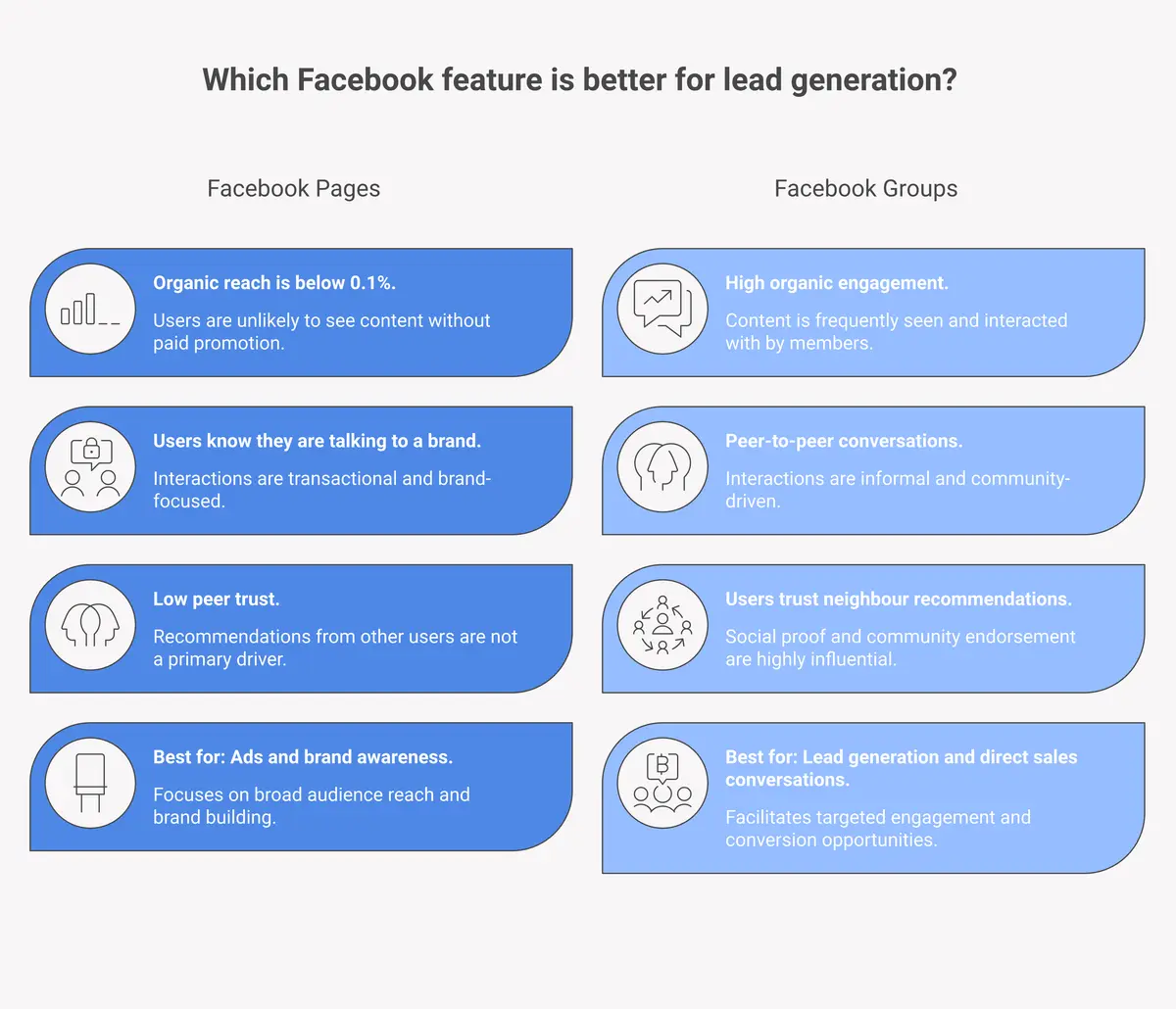
Facebook Groups consistently produce better leads than Facebook Pages, because Groups are built around conversation and peer recommendations while Pages are built for brand broadcasting. A post on a business Page is generally advertising. A post in a Group asking for recommendations is a live buying signal.
Why Pages Fall Short for Lead Generation
Facebook Pages have two structural problems for lead generation. First, organic reach on Pages has declined sharply over the past decade. According to DataReportal's 2024 global digital overview, the average engagement rate on Facebook brand pages has dropped below 0.1% for most industries. Posting on a Page rarely reaches the people who need your product.
Second, Page comments are branded interactions. When someone asks a question in the comments of a business Page, they already know they're talking to a company. There's no peer trust built into that conversation.
What Makes Groups Better for Lead Monitoring
Groups work differently. Members join because they share a common interest or problem, not because they like a brand. When a Group member asks "what email marketing tool should I switch to?", they're asking their trusted peer network. An answer in that context carries more weight than any ad.
Groups also tend to have much higher engagement rates than Pages. Members check in regularly and respond to each other. This creates a steady stream of fresh, community-driven content that includes recommendation requests, problem posts, and buying-intent questions throughout the day.
For facebook group monitoring as a lead generation strategy, Groups are the only format worth tracking. Pages are a broadcast channel. Groups are where the buying conversations actually happen.
Facebook Lead Generation for Local Businesses vs SaaS
Facebook lead generation through Group monitoring works for both local businesses and SaaS companies, but the tactics differ significantly. Local businesses mine hyper-specific geographic communities. SaaS companies target interest-based and professional communities at scale.
Local Business Approach
For local service businesses, the Groups that matter are neighbourhood communities, local buy/sell/recommend groups, local business owner groups, and city-specific interest groups. Someone in a "Denver Homeowners" group asking "anyone recommend a good HVAC company?" is a red-hot lead for a Denver HVAC business.
The key for local businesses is geographic specificity. Track keywords like your service category combined with your city or neighbourhood. "Recommend" and "looking for" are your most powerful signals. Responding first and helpfully to a hyper-local Group post can generate a sale within hours.
Local businesses also benefit from the trust dynamic that makes Group recommendations so powerful. In a local community group, a recommendation from a neighbour or fellow business owner carries enormous credibility. Being the business that shows up and helps, without pushing a sale, builds that kind of reputation over time.
SaaS Company Approach
For SaaS companies, the Groups that matter are professional communities, industry-specific forums, startup groups, and niche interest communities. These Groups are often large, active, and full of decision-makers discussing their tool stacks and workflows.
SaaS companies should track product category keywords ("CRM recommendation," "project management tool"), pain-point keywords ("struggling with ," "need to automate"), and competitor names. The goal is to identify the moment someone is actively evaluating options in your category.
Scale is also different for SaaS. A local business might care about 5-10 specific Groups. A SaaS company might have relevant buyers posting across 200+ Groups globally. That's precisely why automated facebook groups lead generation monitoring is essential for SaaS. Manual tracking at that scale isn't possible.
Both approaches share the same foundation: finding the post before your competition does and responding as a helpful peer, not a salesperson. Set up your monitoring today at Hot Lead Alerts.
The "Helpful Stranger" Method: How to Convert a Facebook Lead Without Being Salesy
The "Helpful Stranger" method is a simple framework for converting Facebook Group leads: lead with genuine help, mention your product only when directly relevant, and let the quality of your answer do the selling. It's the only approach that works in Groups without getting banned or ignored.
Why the Pitch-First Approach Fails
Most people who try to generate leads in Facebook Groups make the same mistake. They see a "does anyone recommend X?" post, immediately drop a link to their product, and wonder why nobody clicks. This approach fails for three reasons.
First, group admins remove promotional posts constantly. A comment that reads like an ad gets deleted and earns you a ban. Second, other members can see through a thin pitch and will flag it or pile on critically. Third, even if your link survives, it sits alongside 10 other links, all equally self-promotional, and the original poster ignores every one of them.
The Helpful Stranger Framework in Practice
The method works like this. When you find a relevant post through facebook lead alerts, open the conversation before mentioning your product. Answer the question with genuine advice, even if that advice doesn't directly sell your tool.
For example, if someone asks "what's the best way to track leads from social media?", your first response should answer the question helpfully. Explain the approach, share a useful framework, or ask a clarifying question about their specific situation. Then, in a second message or as part of your answer, mention that you built a tool for exactly this and offer to share more details if they're interested.
This positions you as an expert first and a salesperson second. The person who asked the question will notice that your answer was the most helpful in the thread, and that creates trust before you ever mention a product.
Timing Is Part of the Method
Being early matters as much as being helpful. A great answer posted six hours after the question gets a fraction of the visibility of a great answer posted 20 minutes after it. This is where automated facebook lead alerts become a competitive advantage. You don't have to be the fastest typist. You just have to be notified first.
Combine Reddit lead monitoring with Facebook Group monitoring and you'll find that the "Helpful Stranger" method works across both platforms. The underlying principle is the same: be genuinely useful to someone who needs help right now, and let that usefulness create the opening for a sale.
Frequently Asked Questions
What is Facebook Group monitoring for lead generation?
Facebook Group monitoring for lead generation means tracking keyword-based conversations inside Facebook Groups to identify posts where people are asking for recommendations or expressing buying intent. Tools like Hot Lead Alerts automate this process, so you get alerts when relevant posts appear without manually scrolling through dozens of Groups yourself.
Is it against Facebook's rules to respond to lead posts in Groups?
Responding helpfully to posts in Facebook Groups is not against Facebook's rules. What most Group admins ban is self-promotional spam, which means dropping a link or pitch without providing value. Genuine, helpful responses that happen to mention your business are generally welcome in most Groups, especially when your answer addresses the original question directly.
How many Facebook Groups should I monitor for leads?
There's no fixed number, but the more Groups relevant to your niche, the more lead opportunities you'll find. A local business might focus on 5-15 geographic communities. A SaaS company might need to monitor hundreds of professional and interest-based Groups. Automated monitoring makes it possible to track a large number of Groups without any manual effort.
How is facebook group monitoring different from running Facebook ads?
Facebook ads push your message to people based on demographic targeting. Facebook Group monitoring pulls you toward people who are actively asking for a solution right now. Ad prospects may or may not be in the market. Group lead posts come from people who are explicitly shopping for what you offer. The intent level is dramatically higher, and the cost per lead is typically much lower.
Can I use Hot Lead Alerts for Facebook Group monitoring without being a member of those Groups?
Hot Lead Alerts monitors publicly accessible Facebook Group content, which means you can receive alerts for relevant posts even in Groups you haven't joined. This is one of the biggest practical advantages of automated monitoring over manual Group membership, since manual monitoring requires approval to join each Group individually.